
Why Mobile is Central to Event Experience in 2025
Mobile apps are no longer a nice-to-have capability, they are the modern event experience. A seamless, easy access to event content, as well as real-time information to the palm of your audiences pocket is what participants expect whether you are managing a 500-person conference, world-class trade show, or internal employee event. Event apps have come a long way from a simple agenda. They are now command centers that provide engagement opportunities, lead generation, connection and networking opportunities, and even analytics for your event. As participant attention spans decrease, so do expectations for personalized event experiences. Executing the right mobile experience will dictate how your attendees move and engage, as well as how they will remember your event. In this blog, we will first discuss the top must-have features in event apps, also some useful extras that should be considered based on the type of event, and finally how you select the right platform based on your needs and the scale of your event.
Top 5 Must-Have Event App Features in 2025
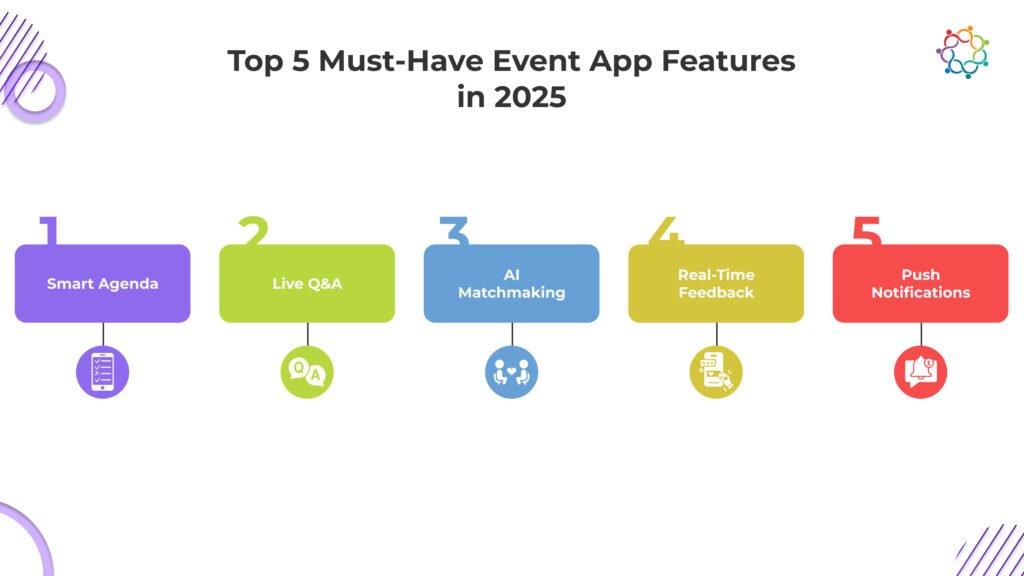
Today’s participants wouldn’t be satisfied with simply the event schedule. They’re looking for active content, contemporary interactions, and meaningful networking that feels informative and current. These five features are considered must-haves in any best-in-class event application:
1. Smart Agenda with Personal Scheduling
A static agenda is a relic of the past. Today’s event apps must deliver dynamic scheduling that adapts to each attendee’s needs.
Key Features:
- Live session listings that update in real-time
- Bookmarks, filters, note taking and reminders tailored to user preferences
- Sync with preferred calendars and push alerts before sessions begin
Why It Matters:
Attendees move between tracks and sessions quickly. Personalized agendas reduce confusion, boost on-time attendance, and help users make the most of their day.
Example:
At a multi-track marketing conference, a CMOs persona filters sessions on AI and economic forecasting, adds them to their agenda, and gets notified 10 minutes before each one begins making it easy to stay on track.
2. Live Q&A and Polling
Passive listening no longer cuts it. Attendees want to interact, and they want it in the moment.
Key Features:
- Live question submissions with upvoting
- Instant polling with live results to inform session discussions
- In-app moderation tools
Why It Matters:
Enabling two-way interaction turns attendees from observers into active participants. This engagement strengthens their connection to the event and keeps content dynamic.
Example:
During a keynote, attendees submit questions via the app. The most upvoted query is addressed live, creating an inclusive atmosphere and stronger connection with the speaker.
3. AI-Powered Networking & Matchmaking
Automatic introductions between attendees can significantly enhance networking outcomes.
Key Features:
- Algorithms that suggest attendees based on role, industry, and interests
- In-app chat and meeting scheduling
- Calendar sync for booked meetings
Why It Matters:
Attendees trust AI when it connects them to peers, they actually want to meet. This increases satisfaction and drives deeper conversations.
Example:
An investor at a startup expo receives suggestions to meet fintech founders based on mutual interest tags. They schedule two 1:1 meetings directly in the app and close a follow-up discussion within weeks, thanks to streamlined match recommendations.
4. Real-Time Feedback Collection
Quality feedback informs improvements, not just later but during the same event cycle.
Key Features:
- Popup ratings at session close
- One-tap “thumbs up/down” or star rating options
- Built-in follow-up prompts
Why It Matters:
Collecting feedback in real time captures honest reactions and empowers organizers to optimize the experience while the event is still happening.
Example:
Attendees at a workshop rate it 4.8 out of 5 right after completion. Organizers spot a drop in feedback for a lunch session and adjust timing for the next day, increasing later session satisfaction by 18%.
5. Push Notifications & Announcements
Unpredictability is part of live events. A solid app ensures attendees stay informed and included.
Key Features:
- Targeted or global notifications
- Clickable messages linked to schedules or sponsor pages
- Channel-specific segmentation
Why It Matters:
Whether there’s a room change, surprise speaker or network mixer, notifications keep attendees engaged and reduce confusion.
Example:
VIP-only meetups are announced via push notifications to select attendees. RSVPs are captured on the spot and organizers coordinate follow-ups—without emails or spreadsheets.
Optional (But Valuable) Features to Consider
Not every event requires every feature. But depending on your format and goals, these can significantly elevate the attendee experience.
- Gamification & Leaderboards
Value: Increases booth visits, app usage, and overall participation
Ideal For: Trade Shows, expos, employee engagement events
- Sponsor Booth Pages
Value: Helps monetise the app by offering visibility to sponsors
Ideal For: Conferences, exhibitions
- Lead Scanning for Exhibitors
Value: Captures leads directly via the app, no additional hardware needed
Ideal For: Expos and B2B showcases
- Interactive Maps & Wayfinding
Value: Reduces confusion and footfall drop-off in large venues
Ideal For: Tradeshows and large-scale events
- Multilingual Support
Value: Increases inclusivity and accessibility for global audiences
Ideal For: International conferences
Note: Always match features to event format and audience. A private roundtable might not need gamification, while a large expo would be incomplete without it.
Samaaro’s Event App – Build What You Need
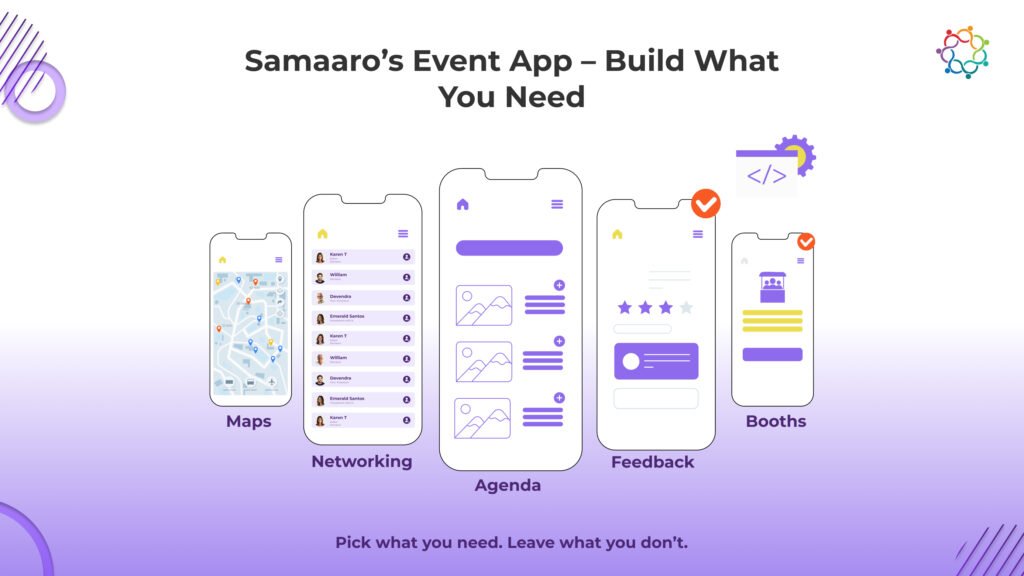
Samaaro’s event app is built to give you exactly what you need, nothing more, nothing less.
Instead of forcing every event into a fixed feature set, it lets organizers activate only the modules they want. This means cleaner interfaces for attendees, and cost savings for you.
What Modularity Means for You:
- Customizable feature sets: Only include the agenda, networking, or scanning modules if needed
- Faster setup: Pre-configured templates for common event types
- More control: No unused features confusing your team or your audience
Real-World Use Cases:
- C-Suite Roundtable: Features enabled: RSVP manager, agenda, and private chat
- Tech Expo: Features enabled: exhibitor booths, interactive maps, lead scanners, gamification
- Brand Launch Event: Features enabled: push notifications, feedback capture, social wall integration
All information, from engagement metrics to scanned leads, syncs back in real-time with Samaaro’s central dashboard and CRM integrations. This allows teams to handle pre-, during, and post-event workflows in one tool.
Samaaro’s mobile event app scales to your format whether you are having 50 or 5,000 attendees.
Comparison Table: How the Top Event Apps Stack Up
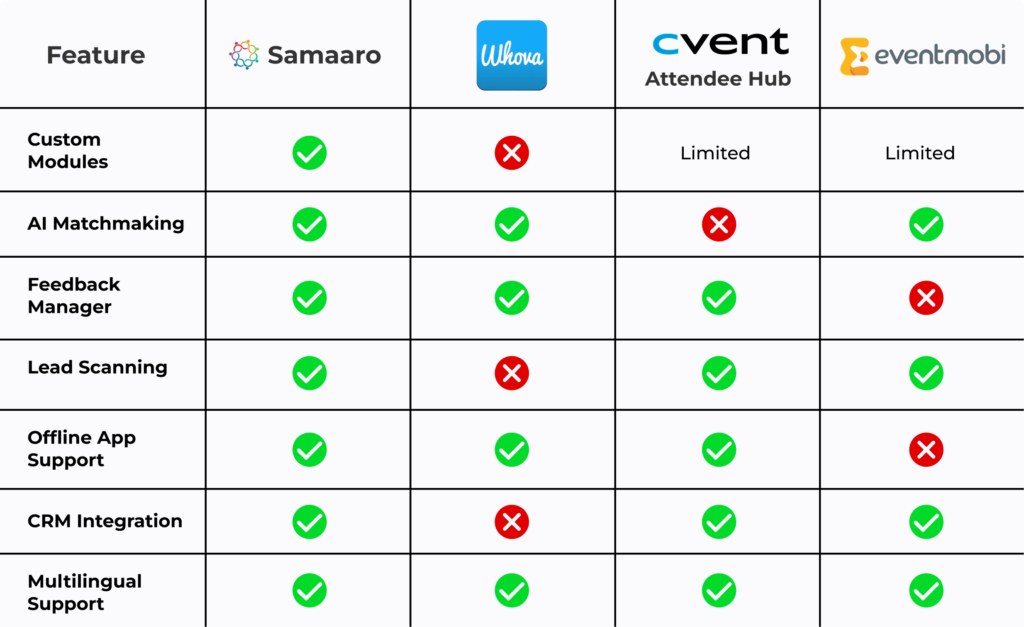
Samaaro’s flexibility, CRM readiness, and lead-gen tools make it a strong choice for enterprise and mid-market event teams alike.
Conclusion: The Right Features, The Right Experience
Having a great event app is no longer a bonus, it is essential. From registration to session engagement to lead collection, the app shapes the attendee experience and drives your event ROI.
But not all apps are created, or meant, for every format. The secret is to align your technology with the overall event goals of conversion, education, brand impact, etc.
Companies like Samaaro are blazing the trails with their modular, mobile-first, integrated event app that can be used for a variety of formats and budgets. You don’t need to pay for bloated platforms or be stuck with a clunky system. Build your stack. Build your impact.
Ready to see how Samaaro’s event app can power your next conference, roundtable, or launch? Schedule a walkthrough today.
Frequently Asked Questions
1. What are the top must-have features every event app should have in 2025?
The must-have event app features in 2025 are smart personalized agendas, live Q&A and polling, AI-powered networking and matchmaking, real-time feedback collection, and push notifications.
2. What is the benefit of live Q&A and polling features in an event app?
Live Q&A and polling turn passive listeners into active participants, surface audience insight instantly, and give speakers real-time feedback to keep sessions engaging.
3. How does AI-powered matchmaking improve networking outcomes at events?
AI matchmaking suggests relevant connections based on role, interests, and behavior, producing more meaningful meetings than random encounters and making networking time genuinely productive.
4. What does a “modular” event app mean, and why does it matter for cost savings?
A modular event app lets you pay for only the features you need. That cuts cost and complexity compared with bloated all-in-one apps full of unused functions.
5. How does an event app integrate with a CRM for lead and engagement tracking?
The app syncs attendee actions, sessions joined, meetings booked, content viewed, into CRM records automatically, powering lead scoring and personalized sales follow-up after the event.